OfficePortalOfficePortal
HR Management
HR Management SoftwareCentralized employee records & documentsTalent Management SoftwareHire, develop & retain your best peopleLeave Management SystemPTO policies, accruals & absence trackingAttendance Tracking SoftwareWeb check-in, biometric & automated capturePerformance Management SystemGoals, reviews & assessment cycles
Workforce
Employee Monitoring SoftwareActivity tracking & productivity insightsShift scheduling softwareShift scheduling, reminders & penaltiesLocation Tracking SoftwareReal-time employee location visibilityCall Tracking SoftwareCall insights, tracking & reporting
Operations
Payroll SoftwareAutomated payroll, expenses & payslipsTask Management SoftwareProjects, task boards & workflowsCommunication and CollaborationInternal social feed & announcementsTravel and ExpenseTrack spend, approvals & reimbursements
All-in-one HRMS for modern teams

Manage HR, attendance, payroll and field operations from a single cloud platform.

Book a Demo
Primary Industries
ManufacturingSaaSHealthcarePharma
Business & Retail
RetailEducationFinanceStartupsE-commerce
Operations
LogisticsAutomobileHospitality
Technology & Welfare
Information TechnologySocial Welfare
Resources
BlogHR tips, guides & industry insightsWhat's NewLatest product updates & featuresReviewsWhat our customers say about usGlossaryHR & payroll terms explainedHelpGuides & product documentation
LEARN
Our StoryDiscover the story behind OfficePortalCareersView open positions and learn about our culture
PricingContact Us
Book a DemoStart Free
Help Center›Employees›How to Add Emergency Contacts in OfficePortal

Employees

How to Easily Invite Employees to Access OfficePortal and Update Work InformationVehicle detailsStatutory optionsSalary RevisionSalary detailsPayslips and formsLoans and salary advancesIncome taxEasy steps Import Employees to OfficePortalExpenses and reimbursementsExit DetailsEmployees directory in OfficePortal HRMSEmployee role based authenticationHow to add a profile picture for an employee in the OfficePortalHow to Add Emergency Contacts in OfficePortalHow to Update Employee Education and Experience Details in OfficePortalHow to Upload and Save Essential Documents in OfficePortal s Cloud SystemHow to Add Bank and Compensation Details in OfficePortalAdd employees manually to the OfficePortal

How to Add Emergency Contacts in OfficePortal

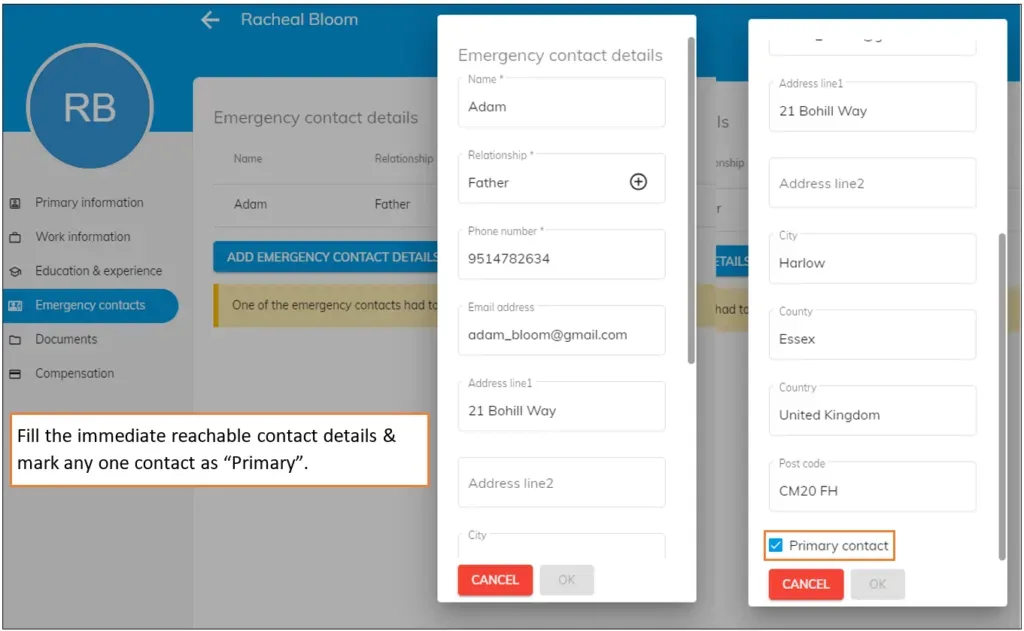
Even though the employee can enter their emergency contacts, you can also enter the emergency contact person’s name, relationship, phone number, and other details on behalf of your employees.

You can update several emergency contacts, but ensure that at least one contact must be chosen as the primary contact by selecting the check box for that contact which will be displayed at the end of the dialogue box (refer to the image for accurate info)
← PreviousHow to add a profile picture for an employee in the OfficePortalNext →How to Update Employee Education and Experience Details in OfficePortal
Back to Employees
OfficePortal

All-in-one HRMS software to manage attendance, payroll, leave, performance and more.

F3, Plot 218, Atrium Spring Meadows,
Chennai, India

+91 89257 85888 · +91 84548 69085

sales@officeportal.io

Google PlayApp Store

Our Products

  • HR Management Software
  • Talent Management Software
  • Leave Management System
  • Attendance Tracking Software
  • Performance Management System
  • Shift scheduling software
 
  • Location Tracking Software
  • Call Tracking Software
  • Payroll Software
  • Task Management Software
  • Communication and Collaboration
  • Travel and Expense

Resources

  • Help Center
  • Blog
  • Glossary
  • Reviews
  • What's New

Company

  • Our Story
  • Careers
  • Contact Us

Get Started

  • Setup Free Account
  • Schedule a Demo
  • Pricing

Legal

  • Privacy Policy
  • Cookie Policy

© 2026 OfficePortal. All rights reserved.