Stop Building Rotas on Spreadsheets. Use Real Employee Shift Scheduling Software
Employee shift scheduling software lets you define shifts, assign them to employees and track attendance against them. In OfficePortal, the HR software from Awarious Technology Solutions, you create shifts with their timings, locations, departments and a daily or weekly recurrence, then assign them to employees from the team shift view. Grace-period rules, check-in and check-out reminders, manager alerts for missed check-ins and auto check-out all come from the shift settings, and employees see their upcoming shifts in My Shifts. Shift scheduling is part of the Premium and Elite plans.
✓ Shift scheduling on Premium and Elite · Free plan for up to 5 users
Trusted by 1,000+ teams worldwide






What is Employee Shift Scheduling Software?
Employee shift scheduling software helps businesses define shifts, assign them to employees and track attendance against each shift's rules. In OfficePortal, shifts sit inside the attendance tracker, so shift timings, grace periods and reminders apply to every check-in.


Shifts Set Up Once
Create each shift with its start and end time, dates, locations, department, colour and the number of people required. The shift duration is calculated for you.
Shifts Assigned by Employee
Assign shifts to employees for upcoming working days from the team shift view, and filter by location, department, job title or shift.
Rules Applied at Check-In
Grace periods, late marks and the minimum hours for a full or half day are checked against each shift, so attendance follows the rules you set.
TOP FEATURES BY STAKEHOLDER
Built for Every Role That Touches the Rota
Shift scheduling affects HR, team managers, employees and payroll differently. Here's what each of them works with in OfficePortal.
Shift Configuration
Create as many shifts as you need, each with its own start and end time, start and end dates, locations, department, work area and colour. Choose daily or weekly recurrence, and for weekly shifts pick the working days and the number of people required.
Full-Day and Half-Day Rules
Set the minimum hours for a full day and a half day, each with a tolerance, and choose whether pay for the shift is calculated per day or per hour.
Grace Period Policy
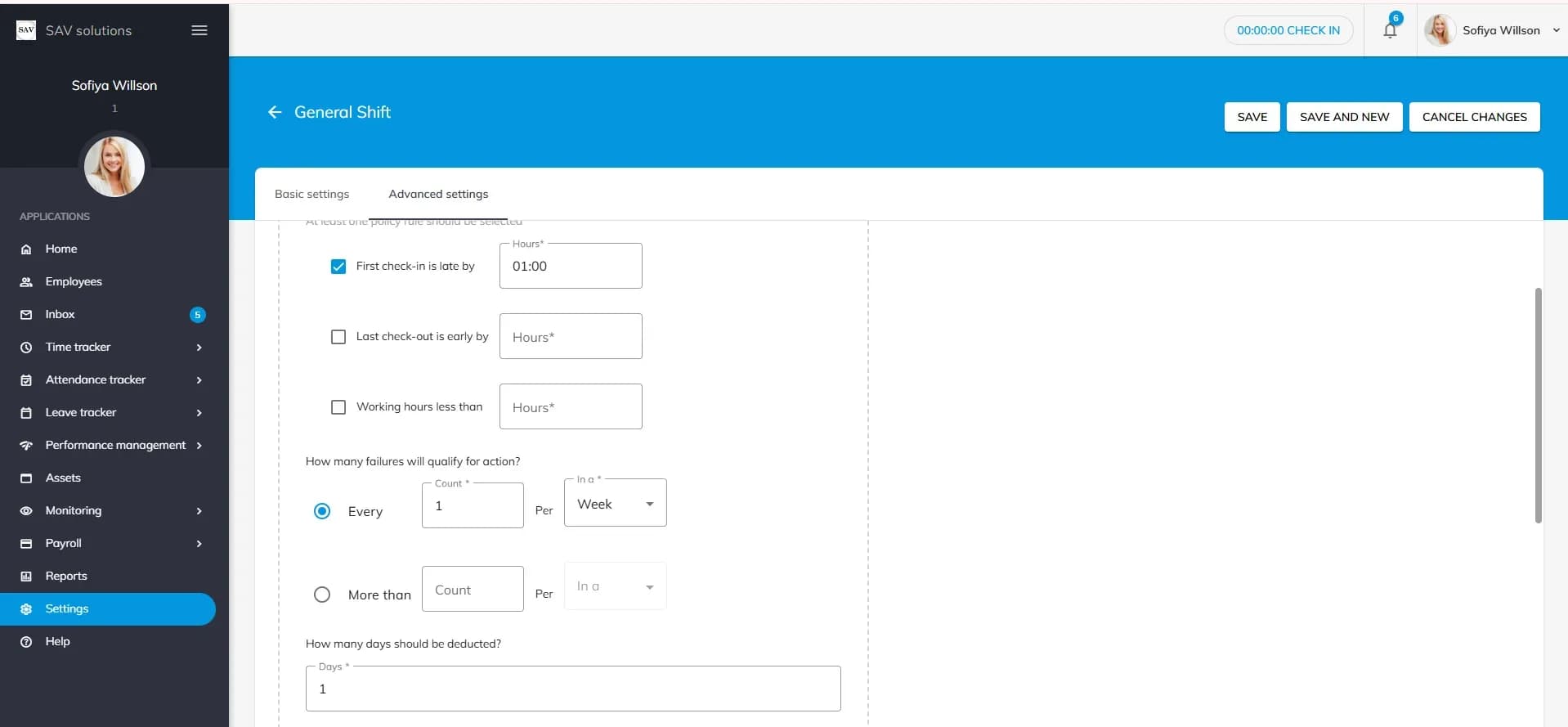
Set rules for a late first check-in, an early last check-out or short working hours, decide how many violations are allowed, and choose how many days are deducted when the limit is crossed.
Overtime From Attendance
On Premium and Elite, overtime is calculated automatically from attendance, so it doesn't have to be worked out by hand at month end.

Shift Configuration
Create as many shifts as you need, each with its own start and end time, start and end dates, locations, department, work area and colour. Choose daily or weekly recurrence, and for weekly shifts pick the working days and the number of people required.
Full-Day and Half-Day Rules
Set the minimum hours for a full day and a half day, each with a tolerance, and choose whether pay for the shift is calculated per day or per hour.
Grace Period Policy
Set rules for a late first check-in, an early last check-out or short working hours, decide how many violations are allowed, and choose how many days are deducted when the limit is crossed.
Overtime From Attendance
On Premium and Elite, overtime is calculated automatically from attendance, so it doesn't have to be worked out by hand at month end.
Assign Shifts From One Screen
The team shift view lists every employee with their working hours and working days. Use the plus icon to assign shifts for upcoming working days.
Filter by Team or Location
Filter employees by name, location, job title, department, role, band, division, shift or employee status.
Alerts for Missed Check-Ins
Reporting managers can be notified when an employee hasn't checked in, for example 10 minutes after the shift starts.
Export Shift Details
Export employee shift details in XLSX format for records and planning.

See Your Shifts
Employees check today's shift and their upcoming shift timings in the My Shifts section.
Check-In and Check-Out Reminders
Reminders can go out before a shift starts and after it ends, for example one hour before check-in and ten minutes after the shift.
Check In Your Way
Depending on your settings, employees check in from the web, the mobile app or a biometric device, and admins can set the method for each employee.
Auto Check-Out
If someone forgets to check out, auto check-out can close the day at a set time after the shift ends.

Attendance Reports for Payroll Review
Attendance and shift records help HR and finance review work hours, late marks and attendance summaries during payroll processing.
Overtime Visibility
Overtime calculated from attendance on Premium and Elite is ready to review when payroll is processed.
Department and Location Filters
Filter shift and attendance views by department, location or team, and export the details to Excel.
Grace-Period Deductions
Days deducted under the grace-period policy are applied automatically, so they don't need to be tracked separately.

Create Shifts With Their Own Rules
Each shift in OfficePortal has a name, start and end time, start and end dates, locations, department and work area. The shift duration is calculated automatically, and you set the minimum hours for a full day and a half day and whether pay is calculated per day or per hour.
- Shift timings and dates
- Locations and departments
- Full-day and half-day hours
- Per-day or per-hour pay

Daily or Weekly Recurring Shifts
Choose a daily or weekly recurrence for each shift. For weekly shifts, pick the working days and the number of people required for each day; the other days are marked as off. The weekend can follow your calendar settings or the shift's own settings.
- Daily or weekly recurrence
- Working days per shift
- People required per day
- Weekend definition
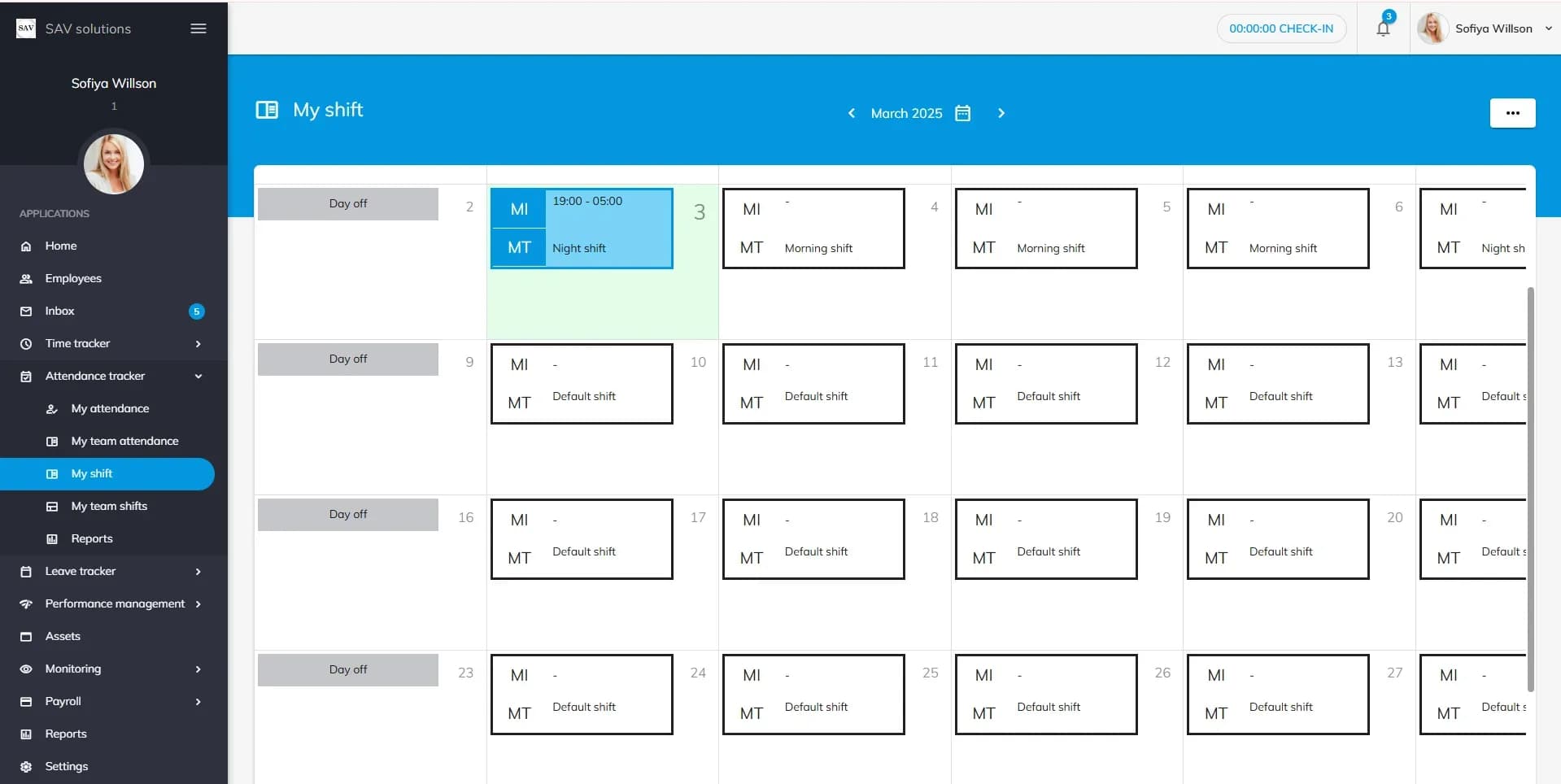
Assign Shifts to Your Team
The team shift view shows every employee with their total working hours and working days. Assign shifts for upcoming working days with the plus icon, switch to the shift view to review all shifts, filter by location, department or shift, and export the details to XLSX.
- Employee and shift views
- Assign upcoming shifts
- Filters by location and department
- XLSX export

Reminders, Alerts and Auto Check-Out
Each shift can send employees a check-in reminder before it starts and a check-out reminder after it ends. Reporting managers can be alerted when someone hasn't checked in, and auto check-out can close the day at a set time after the shift ends.
- Check-in reminders
- Check-out reminders
- Manager alerts for missed check-ins
- Auto check-out
Key Benefits of Employee Shift Scheduling Software in OfficePortal
Shift rules and attendance live in the same system, so the rota and the attendance record match.
No Spreadsheet Rotas
Shifts, timings and working days are set up in OfficePortal instead of being rebuilt in a spreadsheet each week.
Clear Staffing Targets
Record the number of people required for each shift and working day.
Consistent Late and Early Rules
Grace periods and late-mark settings apply the same way to everyone on the shift.
Employees Know Their Hours
Upcoming shift timings are visible in My Shifts, with reminders before each shift starts.
Attendance That Matches the Shift
Check-ins are measured against each shift's timings and minimum hours, and overtime is calculated automatically on Premium and Elite.
Records You Can Export
Shift details export to XLSX for planning and review.
Why OfficePortal Is Worth Using for Shift Scheduling
Shift scheduling sits next to attendance, leave and payroll in one HR system.
A Free Plan to Start
The Standard plan is free for up to five users and includes work shift configuration. Employee shift scheduling and automated overtime calculation are part of Premium and Elite.
Shifts, Attendance and Payroll in One Place
Shift rules shape attendance, and attendance sits in the same platform as payroll, so there's no second system to reconcile.
Grace-Period Rules You Control
Decide what counts as late, how many violations are allowed and how many days are deducted.
Recurring Shifts
Set a shift to recur daily or weekly between its start and end dates, with the working days and headcount you need.
Built for Shift-Based Teams
Manufacturing, retail, hospitality, healthcare, logistics and BPO teams can run several shifts across locations, each with its own rules.
Setup Assistance
Our team helps you set up shifts, locations and attendance rules when you start.
Ready to Replace Your Shift Spreadsheets for Good?
Set up your shifts, assign them to your team and track attendance against them in one system. Start free, or book a demo.
Employee shift scheduling software: your questions
Look for software that lets you define shifts, assign them to employees, apply late and grace-period rules and show staff their shifts. OfficePortal does this inside its attendance tracker, with shift scheduling on Premium and a free Standard plan for up to five users.
In OfficePortal, each shift sets the minimum hours for a full day and a half day and whether pay is calculated per day or per hour. Attendance against those rules, grace-period deductions and overtime are recorded in the same system that runs payroll.
Hotels and restaurants can create shifts for each location, assign them to staff, send check-in reminders and track late marks in OfficePortal. Shift scheduling is part of Premium; see pricing for details.
Shift timings and dates, daily or weekly recurrence, assignment to employees, grace-period and late rules, reminders, and attendance tracked against each shift. OfficePortal includes all of these.
OfficePortal is cloud-based, with Android and iOS apps. Employees can check in from the mobile app and see their shift timings in My Shifts, and managers can follow attendance from anywhere.
Reference Pages
Mobile Workforce Scheduling Software
Cloud-Based Scheduling Software