What is Proof of Investment (POI)?
The Proof of Investment (POI) section in OfficePortal helps HR admins manage employees’ investment plans and their expenses along with the corresponding allowances. This section handles all investment-related preferences, giving admins control over when employees can submit their proof of investment declarations within the payroll cycle.
How to Unlock the Proof of Investment Declaration
To allow employees to submit their proof of investment, follow these steps:
Step 1. Navigate to Settings > Payroll Settings > General Settings > Preferences > Proof of Investment.
Step 2. Click the Unlock button to allow employees to submit their proof of investment declarations.
Step 3. Click Edit.
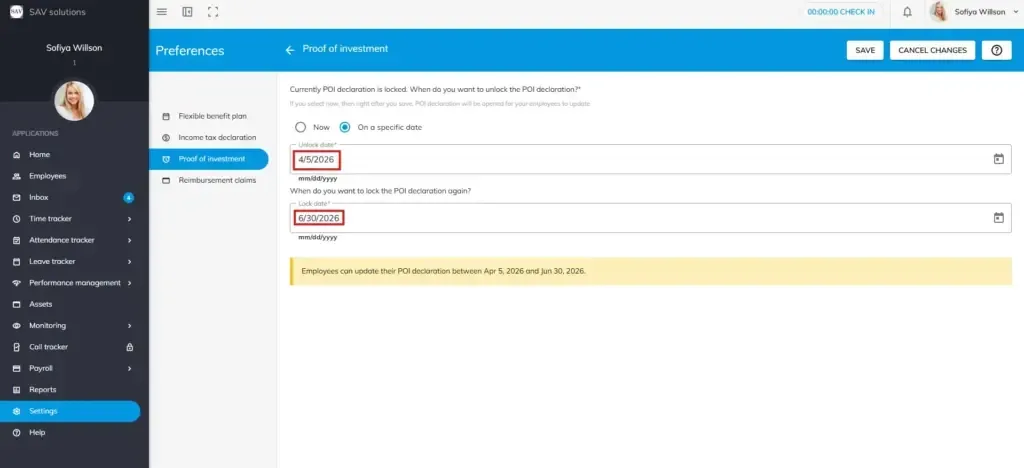
Step 4. Under “Currently POI declaration is locked. When do you want to unlock the POI declaration?”, select your preferred release date:
- Now – Proof of Investment declaration opens immediately after saving, allowing employees to submit their investment proofs right away.
- Specific Date – Enter a date in the Unlock Date field. The POI declaration window will open for employees on that date.
Step 5. Under “When do you want to lock the POI declaration again?”, select a cut-off date to automatically close the declaration window.
Step 6. Enter the desired lock date to define when the Proof of Investment declaration period ends.
Step 7. Click Save.
Example: If you set the unlock date as Apr 05, 2026 and the lock date as Jun 30, 2026, employees can update their Proof of Investment declaration between those two dates.
How to Lock the Proof of Investment Declaration
To restrict employees from making further changes to their proof of investment declaration, follow these steps:
Step 1. Navigate to Settings > Payroll Settings > General Settings > Preferences > Proof of Investment.
Step 2. Click Edit.
Step 3. The Proof of Investment declaration status will show as currently unlocked.
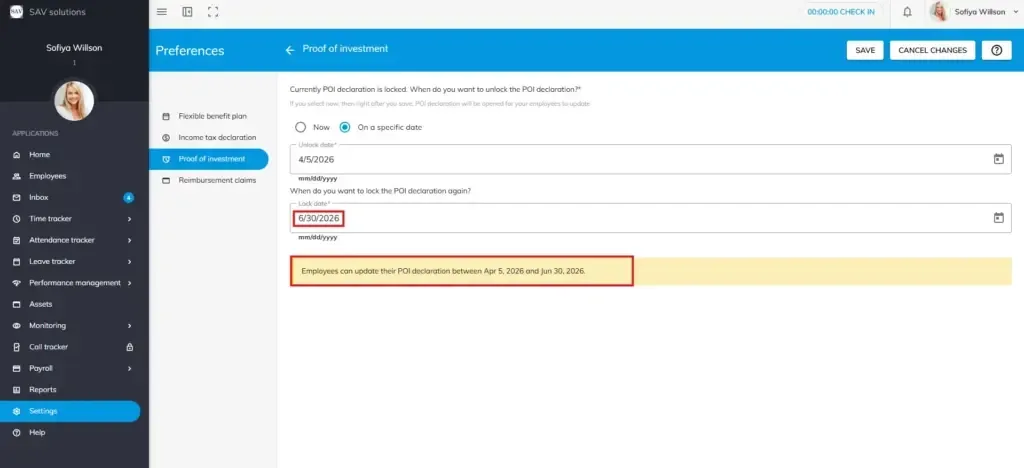
Step 4. Under “When do you want to lock the POI declaration?”, select your preferred lock date:
- Now – Proof of Investment declaration locks immediately after saving. Employees will no longer be able to update their POI declaration.
- Specific Date – Enter a date in the Lock Date field to schedule when the Proof of Investment declaration window closes.
Step 5. Click Save.
Example: If you set the lock date as Jun 30, 2026, employees will be unable to update their Proof of Investment declaration on or after that date.