Driver Reimbursement is a salary allowance paid to an employee as compensation for employing a driver either for a personally owned car or a company-provided vehicle. It is a recognized reimbursement component under Indian payroll and tax regulations, designed to cover the costs associated with hiring a driver for work-related purposes.
A key rule to note is that Driver Reimbursement cannot exceed ₹900 per month, as prescribed under the applicable tax guidelines. Any amount paid beyond this limit may not qualify for the intended tax treatment.
Key Highlights of Driver Reimbursement
- Paid as compensation for the cost of employing a driver — whether for an owned or company-provided vehicle.
- The maximum limit is ₹900 per month — amounts above this threshold are not eligible for reimbursement benefits.
- Can be configured as part of the employee’s Flexible Benefit Plan (FBP), giving employees the flexibility to choose their reimbursement amount within the defined limit.
- Changes made to this component apply only to new employees if the component is already in use.
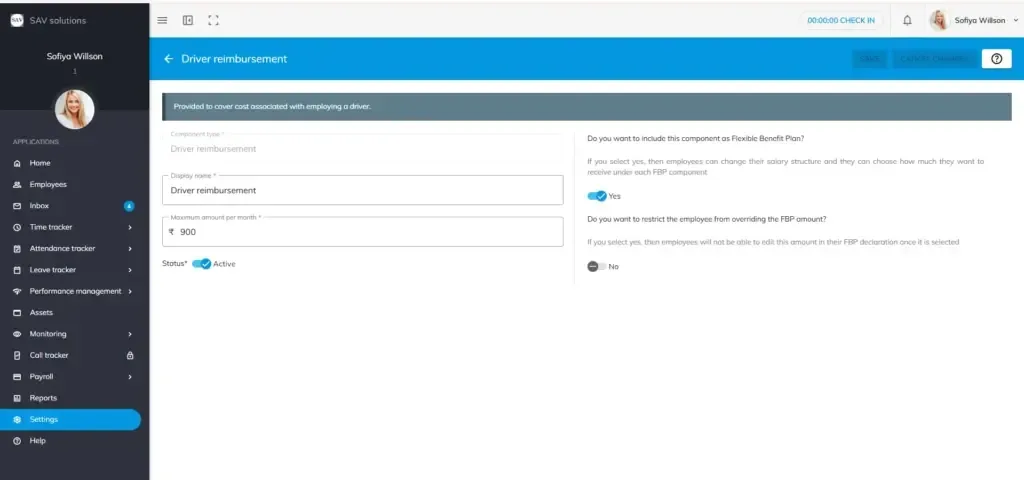
How to Configure Driver Reimbursement in OfficePortal
Setting up Driver Reimbursement in OfficePortal is quick and straightforward. Follow the steps below to configure this component accurately.
Navigate to: Settings → CTC Components → Reimbursement → Driver Reimbursement
Step 1: Enter the Display Name
Enter the Display Name for this component as it should appear in the employee’s payslip and salary structure. For example: Driver Reimbursement.
Step 2: Enter the Maximum Amount Per Month
Enter the Maximum Amount Per Month for this reimbursement component. Ensure this amount does not exceed ₹900 per month, in line with the prescribed limit.
Step 3: Set the Status
Set the status as Active or Inactive based on your organizational requirements.
Step 4: Configure Flexible Benefit Plan (FBP) Options
You will be prompted to configure the following FBP-related options. Enable or disable them based on your organizational needs:
- Do you want to include this component as a Flexible Benefit Plan (FBP)? — If enabled, employees can customize their salary structure and choose how much they wish to receive under each FBP component, including Driver Reimbursement.
- Do you want to restrict the employee from overriding the FBP amount? — If enabled, employees will not be able to edit the Driver Reimbursement amount in their FBP declaration once it has been selected.
Step 5: Save Your Settings
Once all configurations are complete, click Save to apply your changes. To discard any modifications, click Cancel Changes to start over.
.