
The Employees’ Provident Fund (EPF) scheme is a social security initiative by the Indian government to help employees in the organised sector build a retirement corpus. EPF is a mandatory savings scheme funded by contributions from both the employee and the employer every month, automatically calculated based on the employee’s basic salary. This act is governed by the Employees’ Provident Funds and Miscellaneous Provisions Act, 1952, and is applicable across all states and union territories in India.
Who is EPF Applicable To? #
EPF is applicable to all employees earning a basic salary of up to ₹15,000 per month on a mandatory basis. Employees earning above this threshold can also contribute voluntarily under the scheme.
Unlike the Labour Welfare Fund, EPF is not a fixed amount — it is calculated as a percentage of the employee’s basic salary + Dearness Allowance (DA). Based on this act, both the employee and the employer must contribute a certain percentage towards EPF every month.
EPF Contribution Rates & Compliance #
The EPF contribution rate is uniform across all states in India, as it is a central government scheme. Unlike state-specific acts, companies operating across multiple states follow the same EPF rules and rates nationwide, making compliance straightforward.
EPF contributions are deducted monthly without exception, and the deduction is mandatory for all eligible employees. The interest rate on EPF is declared by the government every financial year — currently at 8.25% per annum.
All employees except those working in a managerial or supervisory capacity and drawing wages exceeding the statutory salary limit may be exempted from mandatory EPF coverage, though voluntary contribution remains an option.
EPF Contribution – Example #
An establishment anywhere in India with 20 or more employees must mandatorily register under EPF. The contribution is 12% of basic salary by the employee and 12% of basic salary by the employer. Of the employer’s 12%, a portion — 8.33% — goes towards the Employees’ Pension Scheme (EPS), and the remaining 3.67% goes into the EPF account. Thus, a total of 24% of the basic salary is contributed towards the employee’s long-term social security every month.
How to Configure Employee Provident Fund in OfficePortal #
Once you understand what Employee Provident Fund is, the next step is configuring it accurately in your payroll system. OfficePortal makes this process simple and hassle-free.
Navigate to: Settings → Payroll Settings → CTC Components → Statutory Components → Provident Fund
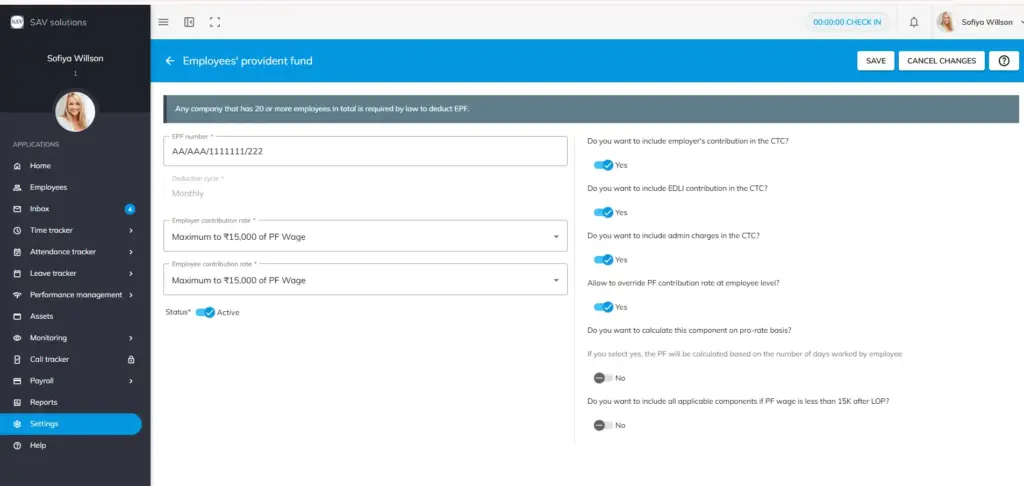
Step 1: Go to Payroll Settings → CTC Components → Statutory Components. Here you will see statutory components such as EPF, ESI, Professional Tax, Labour Welfare Fund and Gratuity.
Step 2: Press the edit option then you will move to Employee Provident Fund window.
Step 3: In the EPF number field, enter your correct EPF number. Deduction type will be monthly by default.
Step 4: Enter the Employer Contribution Rate. Either 12% of total PF wage or maximum to ₹15,000 of PF wage
Step 5: Enter the Employee Contribution Rate. Either 12% of total PF wage or maximum to ₹15,000 of PF wage.
Step 6: Now enable status as Active or disable it as Inactive based on your organisational needs.
Step 7: Then you will be asked to configure the following options. Enable or disable each based on your organisational needs:
- “Do you want to include employer’s contribution in the CTC?”
- “Do you want to include EDLI contribution in the CTC?”
- “Do you want to include admin charges in the CTC?”
- “Allow to override PF contribution rate at employee level?”
- “Do you want to calculate this component on pro-rate basis?” — “If you select yes, the PF will be calculated based on the number of days worked by employee.”
- “Do you want to include all applicable components if PF wage is less than 15K after LOP?”
Step 8: Now click save to save the changes you made or click the cancel changes to restart again.


